Reading the DOM Price Ladder
The DOM is a vertical ladder of prices that shows, at every level near the market, how much is waiting to buy, how much is waiting to sell, and how much has actually traded there.
 Himbit Academy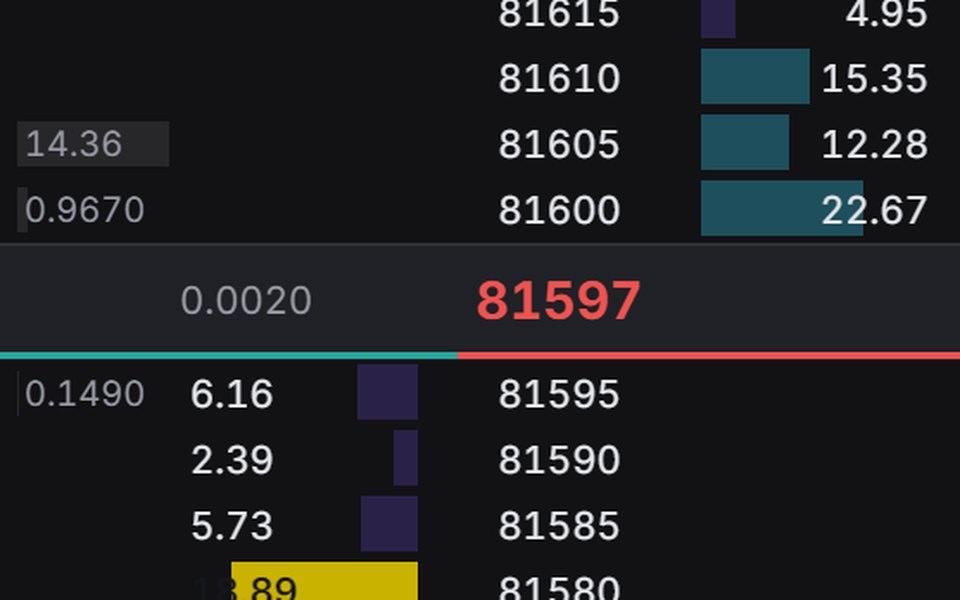
What the ladder shows
In Market Open you find it in the orderbook panel under the DOM tab, next to Book and Delta. Each row is one price. For every row you get the bid size resting there, the ask size resting there, and the volume that has traded at that price. Levels with unusually large size are highlighted so they stand out without you having to read every number. The last traded price is marked, and a centre row keeps the ladder anchored on it so it does not scroll away while price moves.
A chart compresses everything into candles. The ladder does the opposite. It shows you the exact price where the action is happening, one tick at a time.
Resting size versus traded volume
These two numbers look similar but mean very different things, and mixing them up is the most common beginner mistake.
Resting size is intention. It says "I am willing to buy 40 contracts at this price if someone sells to me." It costs nothing to post and nothing to cancel.
Traded volume is fact. It says "40 contracts changed hands here." Somebody committed money.
When the two agree, you can trust the picture more. When resting size is huge but nothing trades there, it is only a claim. When traded volume keeps piling up at a level where the resting size never seems to shrink, someone is refilling their order as fast as it gets hit.
Reading pressure near the last price
Most of the useful information sits within a few ticks of the last price. Further away, orders appear and vanish too easily to mean much.
Take the NVDA perp trading at 182.40. On the ladder you see thin bids under price, a few hundred units each, and thicker offers from 182.45 to 182.60. On its face that looks bearish: more sellers than buyers. Now watch for a minute. Buyers keep lifting the 182.45 offer, the traded column at 182.45 grows, and yet the resting size there never drops below roughly the same amount. Price does not go up, but it does not go down either.
There are two readings, and the ladder will tell you which one is right if you wait. If the 182.45 offer finally runs out and price ticks up through 182.50 and 182.60 quickly, buyers just absorbed a patient seller and the path above is clearer. If buyers stop lifting and the bids under price start getting hit instead, the seller won and price is likely to slip. What you should not do is decide in the first ten seconds.
A few other things worth noticing:
- Bids that get pulled as price drops toward them. Nobody wants to catch it, and moves down can speed up.
- Size that steps forward. If the best bid keeps improving by a tick each time it gets filled, a buyer is chasing.
- Traded volume clustering at one price for a long time. That price is being fought over, and the side that wins it often gets a quick move.
Large-level highlights
The highlights are handy because they save you from scanning dozens of rows. But a highlighted level is only a large order, not a strong one. Large orders can be pulled, as the heatmap lesson explains. Treat a highlight as a question: "what happens when price gets here?" and then watch the traded column when it does.
Mistakes to avoid
Adding up all the bids and all the asks on the screen and comparing the totals tells you very little. Orders twenty ticks away are cheap to place and rarely get hit.
Reading the ladder on a fast market without a plan is tiring and leads to impulsive clicks. Decide beforehand which level you care about, then use the ladder only around that level.
Finally, the ladder has no memory. It shows the present. Keep a chart beside it so you know whether you are at the top of a range, the bottom, or in the middle of nowhere.
Try it on Market Open
- Open a liquid market such as BTC or ETH, open the orderbook panel and switch to the DOM tab.
- Pick one highlighted level near price and watch it until price reaches it. Write down whether it was pulled, partly filled, or fully traded through.
- Compare the same moment on the Book tab and on the chart, so you learn how one event looks in three views.
- Practise placing and cancelling orders around that level in the demo account before trading it with real money.
Educational content, not investment advice. Leveraged trading can lose more than your margin.