
Mirage Liquidity Sweep Pro
Mirage Liquidity Sweep Pro, by Himbit-AlgoTrade, finds liquidity sweeps (stop hunts), scores each one from 0 to 100, can wait for a change of character (CHoCH) to confirm it, and then draws a full trade plan on the chart: entry, a stop beyond the sweep wick, three take-profits, break-even after TP1 and the nearest opposite liquidity as the target.
Turn it on
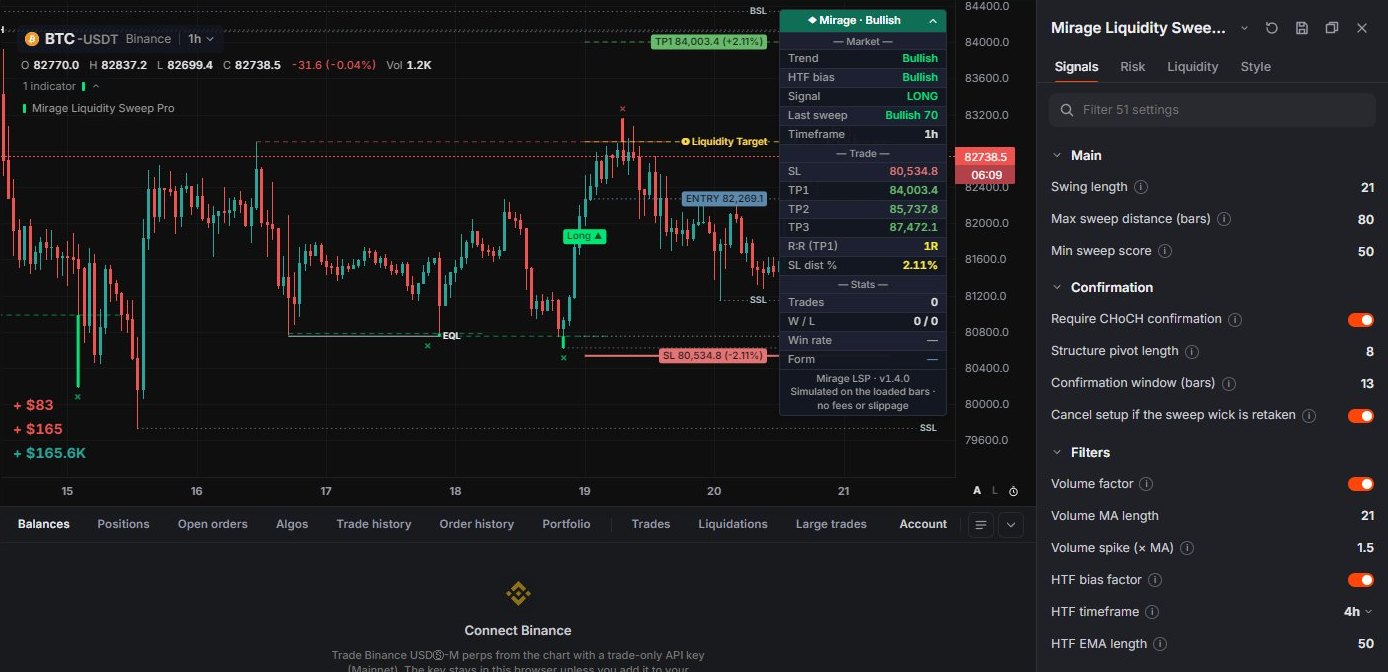
Open Indicators › Price action › Mirage Liquidity Sweep Pro. It is off until you add it. The gear on its legend row opens the settings, in four tabs: Signals, Risk, Liquidity and Style.
While Mirage is on, the chart loads older history in the background, about 4,000 bars, so the swings and the statistics have more to work with.
The idea
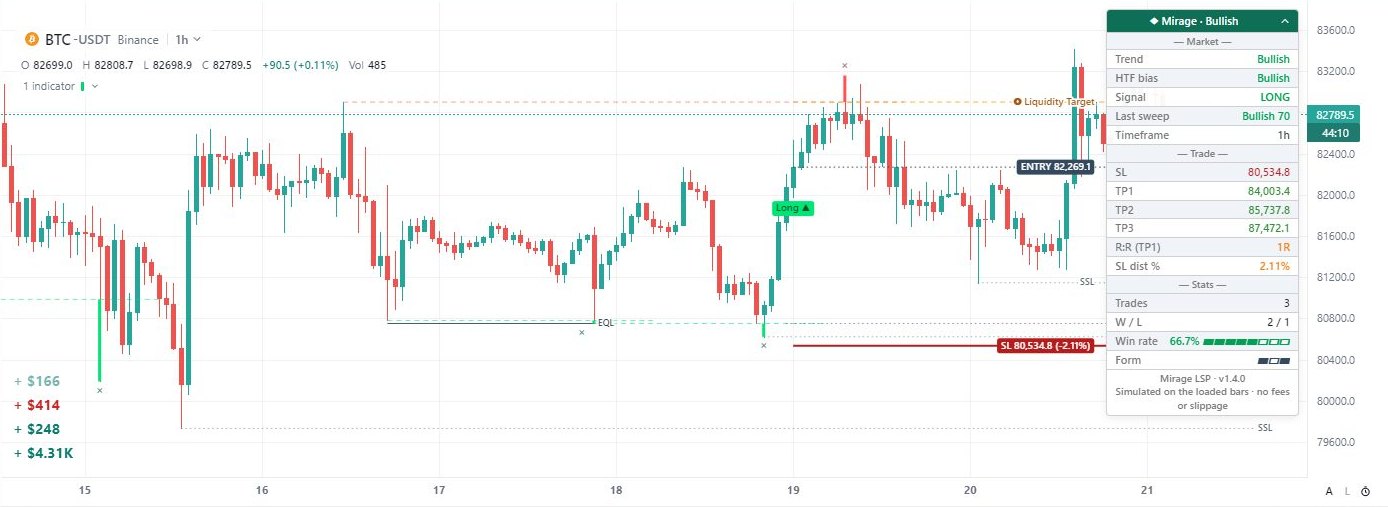
Price often turns where resting orders sit. A swing high above the market holds buy-side liquidity (BSL); a swing low below it holds sell-side liquidity (SSL). When a wick spikes through one of those levels and the candle closes back inside, the move took those orders and was rejected. That is a sweep.
A close beyond the level, or exactly on it, is a break instead: the level is used up and gives no signal.
How it works
- Swings. Confirmed swing highs and lows (Swing length 21) are kept as resting liquidity. Swings that are almost level with each other (within 0.15 × ATR) are joined as equal highs and lows (EQH / EQL).
- Sweep. Only levels younger than Max sweep distance (80 bars) can give a signal. A bar that sweeps a high and a low at once is skipped.
- Score. Each sweep gets a score from 0 to 100: wick depth 30%, how far price closed back past the level 25%, where the candle closed 20%, volume 15% (neutral on markets without volume) and the higher-timeframe EMA trend 10%. A sweep needs at least Min sweep score (50).
- Confirmation. With Require CHoCH confirmation on (the default), the sweep waits up to 13 bars for a close through the last minor pivot. If price goes beyond the sweep wick first, the setup is cancelled. With it off, the signal comes on the sweep bar itself.
- Trade plan. Entry is the close of the signal bar. The stop sits beyond the sweep wick by ATR × the buffer, and at least ATR × 0.5 from entry. TP1, TP2 and TP3 are multiples of the risk (R).
- Management. One trade at a time. When TP1 is touched, the stop moves to entry (break-even). The trade ends at the stop, at the break-even stop or at TP3.
Mirage only uses closed bars, so nothing repaints.
Reading the chart
- Long ▲ / Short ▼: a signal; a trade opens here.
- ×: a raw sweep, where liquidity was taken. It shows even when no trade opens.
- A dashed line marks the swept swing level, and a thick tick shows how far the wick went through it.
- ENTRY, SL and TP1–TP3 lines, with labels and the distance from entry in %. A target that was touched turns solid teal with ✓. After TP1 the SL line dims and the entry label reads "→ SL (BE)".
- The gold dashed Liquidity Target line: the nearest untouched liquidity on the other side.
- Dotted BSL / SSL lines: liquidity that hasn't been swept yet. EQH / EQL connect near-equal highs and lows. A level disappears once it is taken, and the lines reach at most 15 bars past the current bar.
Hover a marker or a line for details, such as the sweep's score or a target's R.
The dashboard
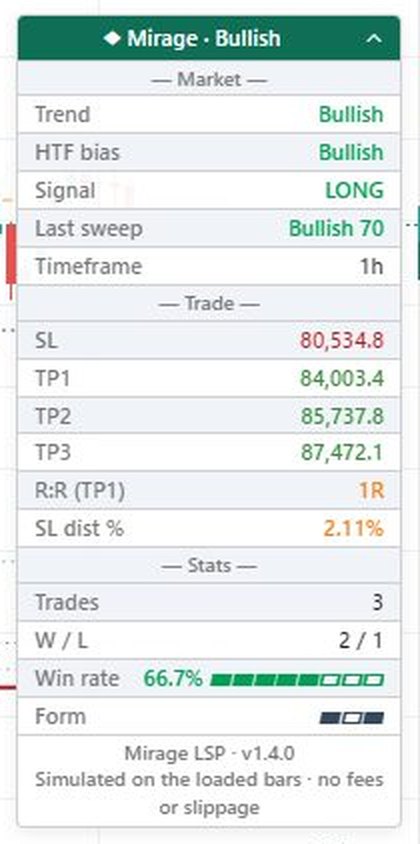
The dashboard starts folded to one line in the top-right corner of the chart, ◆ Mirage · Bullish or Bearish. Click it to open:
- Market: Trend, HTF bias, Signal (LONG or SHORT in a trade, Wait when flat), Last sweep with its score, and Timeframe.
- Trade: SL, TP1–TP3 (✓ once touched, BE @ once the stop has moved to entry), R:R (TP1) and SL dist %.
- Stats: Trades, W / L, Win rate with a gauge, and Form, the last 10 results with the newest on the right.
The stats are simulated on the bars loaded in the chart, with no fees or slippage. A trade counts as a win as soon as TP1 is touched, so a trade that comes back to break-even after TP1 is still a win. Read the win rate with that in mind.
Settings
- Signals: Swing length, Max sweep distance, Min sweep score; Require CHoCH confirmation, Structure pivot length (8), Confirmation window (13 bars), Cancel setup if the sweep wick is retaken; Volume factor, Volume MA length, Volume spike (× MA), HTF bias factor, HTF timeframe (4h) and HTF EMA length (50).
- Risk: Risk preset sets the SL buffer (× ATR) and TP1 / TP2 / TP3 (in R): Conservative 0.5 / 1 / 2 / 4, Balanced 0.25 / 1 / 2 / 3 (the default), Aggressive 0.15 / 1.5 / 2.5 / 4, Scalping 0.1 / 0.8 / 1.5 / 2, or Custom with your own values (TP1 < TP2 < TP3). Also ATR length, Break-even after TP1, and how the trade lines and labels look.
- Liquidity: resting liquidity, Levels per side (6), Line extension (10 bars, at most 15), equal highs and lows with their tolerance, and the liquidity target.
- Style: the theme (Auto follows the app), which marks to draw, the colours, and the dashboard: position, font size and its three sections.
Too few signals? Lower Min sweep score to 40–45, shorten Swing length, or turn the CHoCH confirmation off. Too many weak ones? Raise Min sweep score to 60 or more and keep the confirmation on.
Alerts
Right-click the chart, pick Add alert on Mirage Liquidity Sweep Pro, then the signal: Long entry, Short entry, Stop loss hit, Break-even stop-out, Break-even activated, TP1 hit, TP2 hit or TP3 hit. They fire when the bar closes. The rest of the flow is on the Alerts page.
Mirage is an analysis tool, not financial advice, and it doesn't place orders. Try it on your own market and timeframe before you rely on a signal.