Turtle Soup: How to Trade It, With Its Default Settings
Breakout traders park their stops just past the obvious highs and lows, and the market knows exactly where they are. Turtle Soup waits for price to run those stops, fail, and turn the other way, then trades the turn with a stop and a target already drawn. Linda Raschke and Larry Connors published the idea back in 1995. In Himbit Markets it is built in and free, with its own Backtest panel that shows the fees it paid. On TradingView, tools like this usually mean a paid plan or an invite-only script.
 Himbit Academy
How to read it
Every trade on the chart follows the same three steps.
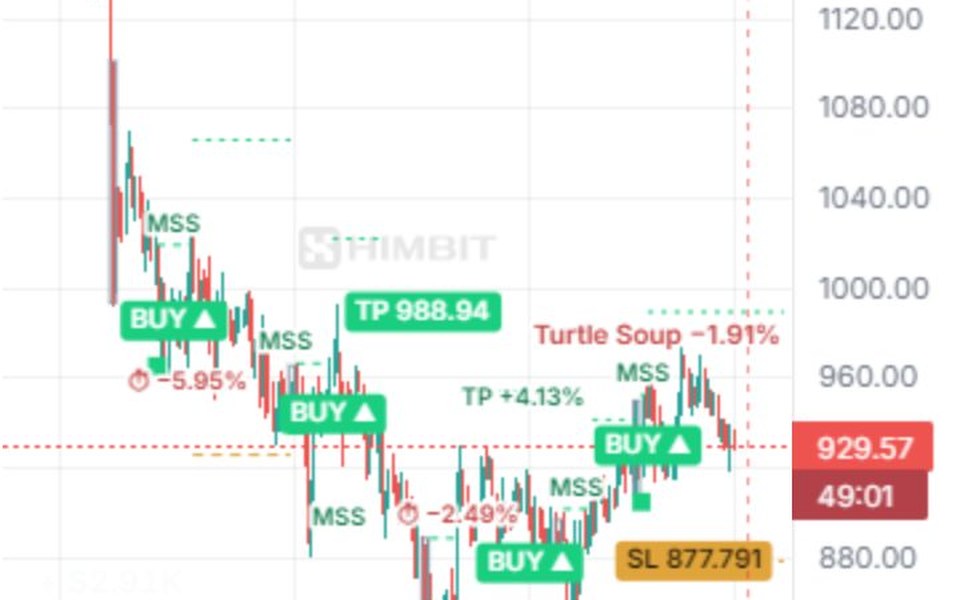
- The liquidity sweep. A grey box marks the range that was swept, and a small square marks the sweep candle: a wick past the range high or low (with the session rules, also a close back inside).
- The break the other way. A dashed line labelled MSS (Classic rules) or CHoCH (session rules) shows price breaking the recent swing against the sweep. That break confirms the grab failed.
- BUY ▲ / SELL ▼. BUY after a failed sell-side grab (a sweep below the low), SELL after a failed buy-side grab. The amber dashed line is the stop and the coloured dashes are the targets. The open trade labels them, for example SL 877.791 and TP 988.94.
When a trade closes, its result stays on the chart where it exited: TP, SL, BE (stopped at entry) or ⏱ (time exit), each with its % move. Beside the last candle, Turtle Soup +x % shows the open trade's P&L, or Last Turtle Soup +x % once it has closed. Hover any tag for the details: entry, stop, target and the result after fees.
The corner table
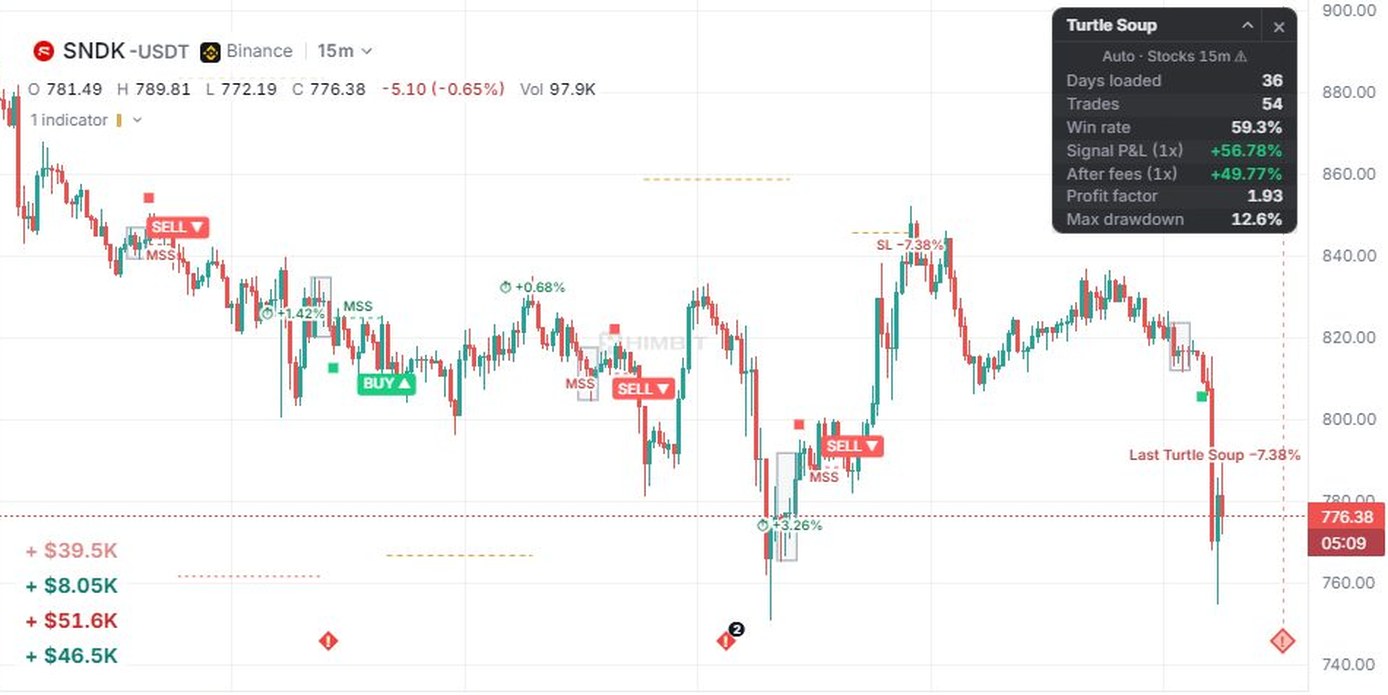
A card titled Turtle Soup sits in the top-right corner of the price pane. Its first line says which settings are running, for example Auto · Crypto 1h ✓, Auto · Oil 5m ✓ or Auto · Stocks 15m ⚠ (Manual when you set it up yourself). Below that, for the history loaded on the chart: Days loaded, Trades, Win rate, Signal P&L (1x), After fees (1x), Profit factor and Max drawdown.
▴ folds the card to its title line. × closes it and leaves a small ▦ Turtle Soup chip in the corner; tap the chip to bring the card back. The card remembers its state on this device, and on a phone it starts folded.
If After fees is negative on your market and timeframe, take that seriously: the indicator is telling you its rules have not paid there lately.
Default settings: picked by market and timeframe
Settings by timeframe is on by default. The settings load by themselves for the chart's timeframe and the kind of market:
Crypto markets use the set tuned on ZEC.
Stocks and other TradFi markets (Binance TradFi perps, CFDs and Hyperliquid builder markets such as xyz:SNDK) use the set tuned on SNDK.
BTC, gold (XAUUSDT) and oil (CLUSDT) on Binance have their own sets, which win over the market-kind set where one exists.
Each set was searched on the latest 30 days and checked on the 30 days before. Then it was run once, unchanged, on two more 30-day windows that were never used for tuning (21/08–19/09 and 21/07–21/08/2026). ✓ means it stayed positive on both of them, with at least 20 trades in each. ⚠ means it did not. Only two presets earned the ✓: Crypto 1h and Oil 5m. Treat every ⚠ preset's signals as ideas, not as a tested edge.
The legend shows the same thing in short: Auto · 1h for the tested preset, Auto · 15m ⚠ for the others.
Crypto (tuned on ZEC)
| Timeframe | Rules | Settings | Status |
|---|---|---|---|
| 1m | Session rules on a rolling range of 36 bars | swing 6 · market entry · target 3 × risk · no stop buffer · EMA 50 trend filter · sweep at least 0.1 ATR · ATR at least 0.15 % | ⚠ |
| 5m | Classic | range 15 min · break 10 · wick · stop ATR(5) × 6.5 · target 1 × risk · break within 50 bars · sweep at least 0.5 ATR · ATR at least 0.15 % · stop to entry at 1 R · close after 120 bars | ⚠ |
| 15m | Classic | range 30 min · break 3 · close · stop ATR(5) × 8 · target 10 × risk · break within 10 bars · London + New York only · sweep at least 0.1 ATR · ATR at least 0.2 % · stop to entry at 0.5 R · close after 120 bars | ⚠ |
| 30m | Classic | range 120 min · break 5 · wick · stop ATR(5) × 10 · target 5 × risk · break within 50 bars · sweep at least 0.25 ATR · ATR at least 0.05 % · stop to entry at 1 R · close after 60 bars · trailing stop 3 × ATR(14) | ⚠ |
| 1h | Classic, Adaptive | range 120 min · break 10 · wick · stop ATR(5) × 1.15 · target 0.5 × risk · break within 10 bars · ATR at least 0.05 % · stop to entry at 1 R · close after 30 bars · trailing stop 3 × ATR(14) | ✓ |
Stocks / TradFi (tuned on SNDK)
| Timeframe | Rules | Settings | Status |
|---|---|---|---|
| 1m | Classic, Adaptive | range 15 min · break 14 · close · stop ATR(5) × 10 · target 0.7 × risk · break within 20 bars · London only · sweep at least 0.25 ATR · ATR at least 0.1 % | ⚠ |
| 5m | Classic, Adaptive | range 120 min · break 3 · close · stop ATR(5) × 2 · target 1 × risk · break within 20 bars · EMA 50 trend filter · ATR at least 0.2 % | ⚠ |
| 15m | Classic | range 60 min · break 5 · wick · stop ATR(5) × 5.5 · target 2 × risk · break within 10 bars · London + New York only · sweep at least 0.1 ATR · ATR at least 0.1 % · close after 30 bars | ⚠ |
| 30m | Classic, Adaptive | range 120 min · break 5 · wick · stop ATR(5) × 4.5 · target 1.5 × risk · break within 20 bars · London + New York only · ATR at least 0.2 % · close after 10 bars · trailing stop 5 × ATR(14) | ⚠ |
| 1h | Classic | range 240 min · break 3 · wick · stop ATR(5) × 2 · target 5 × risk · no break limit · London + New York only · sweep at least 0.1 ATR · ATR at least 0.1 % · stop to entry at 0.5 R · close after 30 bars · trailing stop 2 × ATR(14) | ⚠ |
BTC, gold and oil (Binance)
| Market | ✓ | ⚠ |
|---|---|---|
| BTC | none | 1m, 5m, 15m, 1h (30m uses the Crypto set) |
| Oil (CLUSDT) | 5m | 1m, 15m, 30m, 1h |
| Gold (XAUUSDT) | none | 1m, 5m, 15m, 30m (1h uses the Stocks set) |
BTC 15m and oil 1m passed the first unused window but not the second, so they carry ⚠. On the two unused windows, oil 5m made +3.0 % (43 trades) and +0.4 % (47 trades): positive, but thin.
"Range" is the high and low of the last so many minutes that gets swept. "Break" is how many bars the swing has that price must break the other way. "Adaptive" turns the side toward the one that has been winning. Any other timeframe uses the studied one just below it (above 1h, the 1h set) and is marked ⚠, because it was never tested there.
The two rule sets
Turn off Settings by timeframe and the inputs take over. Under Rules you choose:
- Classic: a rolling range is swept, then a break of the recent swing the other way enters at the next candle's open. The stop sits beyond that swing plus a multiple of ATR(5), the target is a multiple of the risk (or a fixed %).
- Asia session: the Asia high or low (00:00–08:00 UTC) is swept during London or New York, with a wick past it and a close back inside. A change of character follows before the New York close, and a limit waits at the first fair value gap of the move, or else the order block before the sweep. The stop goes beyond the sweep extreme, and the target is the range middle, the far side, half at each, or a multiple of the risk.
- Rolling range: the same session rules on a rolling range.
The manual defaults are Classic: range 60 min, break 10, wick, Classic side, stop ATR(5) × 3.5, target 0.9 × risk, no break limit and no filters. The Filters group adds signal time (London, New York, US session 08:00–17:00 or US open 09:30–11:30 New York time), sweep depth, minimum ATR, stop to entry at x R and the trend EMA.
Backtest after fees: what holds up
Binance perps, fees 0.045 % per side plus 0.02 % slippage, 1x, entries at the next candle's open, no target taken on the entry candle, and the stop counted first when a candle hits both. Open trades are left out.
A preset earns ✓ only if it stayed positive on both of two 30-day windows that were never used for tuning, with at least 20 trades in each. Today two presets meet that bar: Crypto 1h (tuned on ZEC) and Oil 5m.
- ZEC 1h (✓): +44.2 % on the 30 days it was tuned on (19/10–18/11/2026, 22 trades) and +3.7 % on the check window before it (19/09–19/10, 25 trades). On the two untouched windows it made +49.1 % (21/08–19/09, 26 trades) and +0.2 % (21/07–21/08, 22 trades). That last one is barely above zero: the ✓ rests on a thin margin.
- Oil 5m (✓): +3.0 % (43 trades) and +0.4 % (47 trades) on the two untouched windows. Positive, but thin.
- BTC 15m (⚠): +5.1 % on the first untouched window (33 trades), but only 11 trades on the second, so it does not count.
- The SNDK set (⚠): negative on its first untouched window at all five timeframes, from −10.8 % to −50.8 %. That is why every Stocks preset carries ⚠.
- Some presets made over 70 % on the 30 days they were tuned on (SNDK 1m, ZEC 15m, ZEC 30m) and then fell back on the other windows. A tuned number is what the search was fitted to. It is not a result to expect.
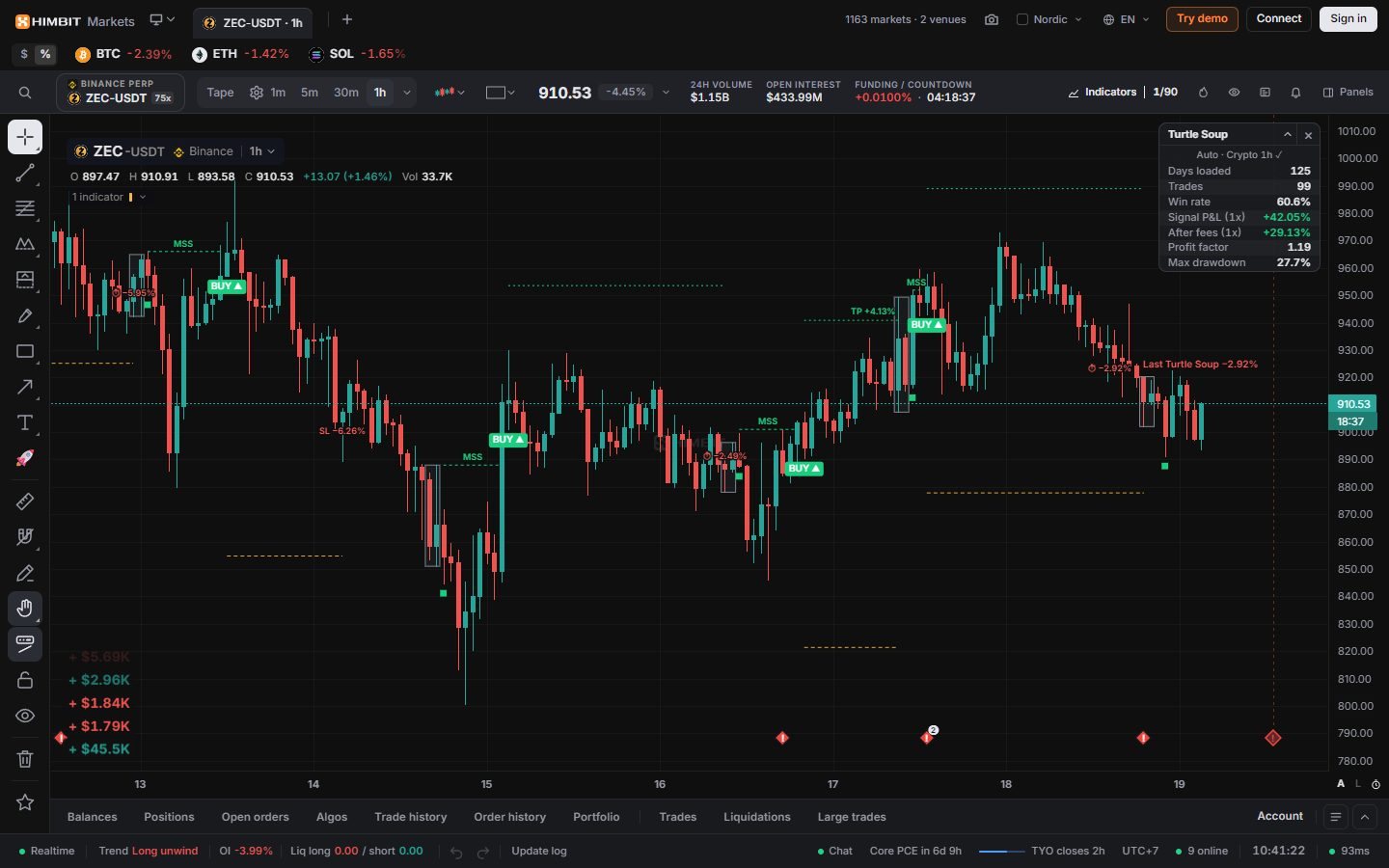
Note the gap between +0.2 % and +49.1 % for the same setting on two different months, and the 27.7 % drawdown on the longer chart history. That spread is normal for a strategy like this, and it is the honest picture. Past results do not guarantee future results.
The Backtest panel
Open Panels › Tools › Backtest (on a phone, the Panels sheet, under Tools). It is free, and nothing is traded: it replays the strategy on real candles in a background worker, so the chart stays responsive while it runs.
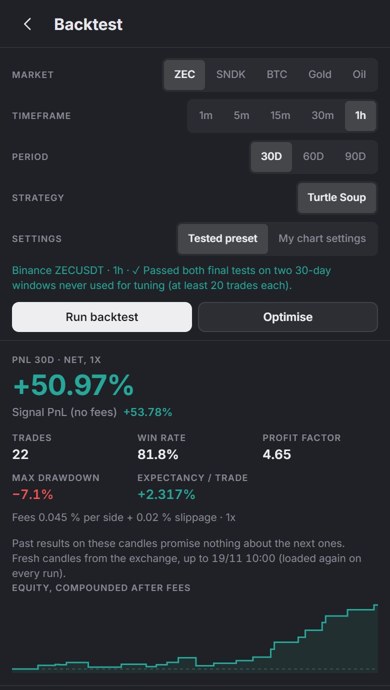
- Pick the Market (quick picks ZEC · SNDK · BTC · Gold · Oil, Binance perps), the Timeframe (1m, 5m, 15m, 30m, 1h) and the Period (30D, 60D, 90D).
- Under Settings, choose Tested preset or My chart settings. The line underneath tells you the preset's status, for example ✓ Passed both final tests on two 30-day windows never used for tuning (at least 20 trades each).
- Press Run backtest. Every run loads fresh candles from the exchange up to now, and the panel says until when. You get PnL 30D · net, 1x with Signal PnL (no fees) under it, then Trades, Win rate, Profit factor, Max drawdown and Expectancy (the average net result per trade), the fee line, an equity curve compounded after fees and the list of trades with their time, side, entry, exit, result and reason.
- Press Optimise to search the last 30 days on that timeframe: up to 5 000 settings in 6 rounds, at least 20 trades each. Each of the top results shows Check (30 days before) first, then Tuned period (last 30 days), shown dimmed. Read the check column first. The search never saw those 30 days. The tuned number is what it was fitted to.
- Apply to chart copies a result into the Turtle Soup inputs, turns Settings by timeframe off and turns the indicator on. It fits the timeframe you optimised. Create bot opens the Bot tab with that result (see below).
The panel's numbers move as new candles arrive, so a run today won't match the study's figures exactly.
Let the bot trade it
The Bot tab of the order panel has a Turtle Soup bot, on Binance and Hyperliquid. It runs the same rules as the chart and the Backtest panel at every candle close: a Market order at the next open, the indicator's stop and target placed on the exchange, one trade at a time, no Martingale.
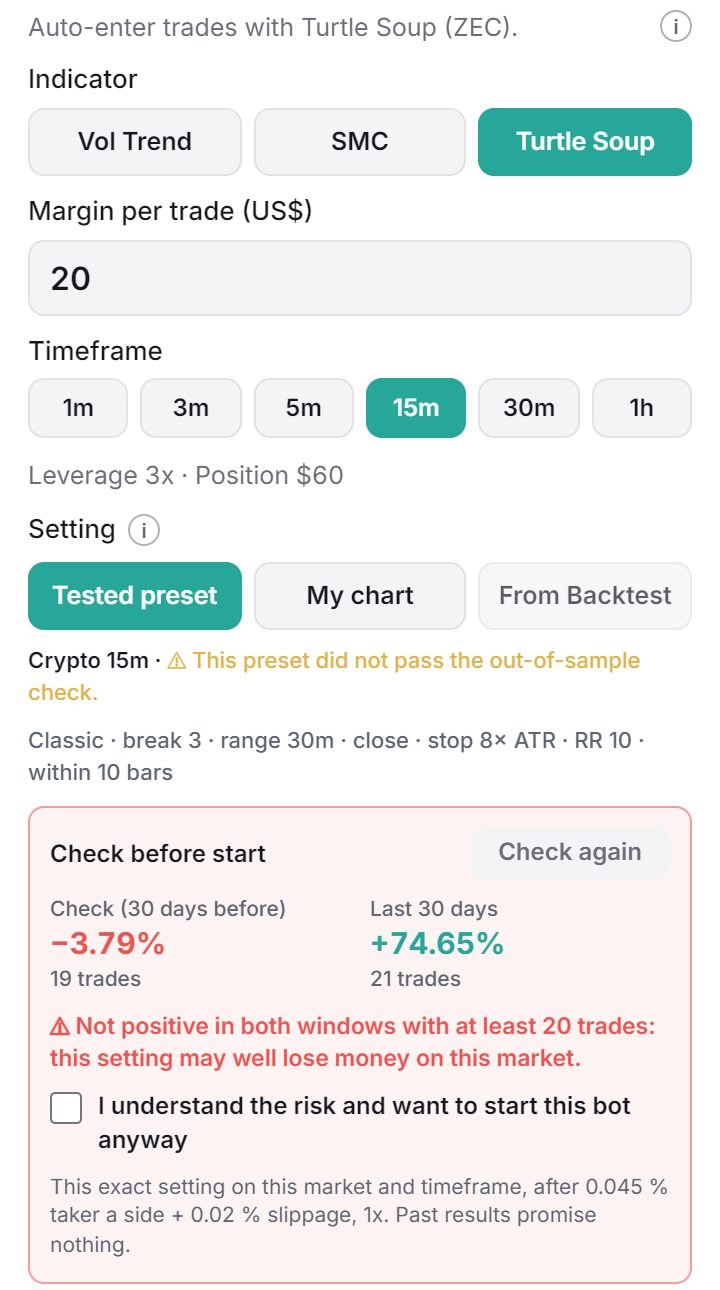
- Pick Turtle Soup under Indicator, then the Margin per trade (US$) and the Timeframe.
- Under Setting, choose Tested preset, My chart or From Backtest (the result you sent with Create bot).
- Check before start runs that setting again on fresh candles: Check (30 days before) and Last 30 days, after fees. If it is not positive in both with at least 20 trades, or the preset is ⚠, you have to tick I understand the risk and want to start this bot anyway.
- Leverage is 3x by default (1x to 10x) and the Daily loss limit (US$) is half the margin by default. The bot pauses itself when the day's (UTC) loss reaches it.
- Press Start. The bot never starts by itself and never re-tunes itself: run Optimise again every week or two.
All the numbers in this lesson are at 1x. At 3x, every win and every loss is three times larger.
How to trade it
- Start where it was tested. Crypto 1h and oil 5m are the only ✓ presets. Elsewhere, read the corner table before trusting a signal.
- Take the signal at the close. BUY or SELL is confirmed when the candle closes, and the entry is the next open (or the limit, with the session rules).
- Use the stop it draws. Never move it further away. Where a preset has a stop-to-entry step (1 R on Crypto 1h), the stop moves to entry by itself.
- Let the target or the clock close it. Several presets close after a set number of bars. That ⏱ exit is part of the tested rules.
- Keep leverage low. Every number here is 1x. A run of stops at 10x is a very different month.
Alerts
Right-click the chart (long-press on a phone) and pick Add alert on Turtle Soup. The signals are BUY signal, SELL signal, Target hit and Stop hit. Turtle Soup alerts run in the app: keep Himbit Markets open with a chart of that market and timeframe. See Alerts.
Honest notes
- Closed candles only: a signal appears when its candle closes and is not redrawn.
- Only Crypto 1h and Oil 5m passed both final tests, and both by a thin margin on one window. Every other preset is ⚠.
- The corner table counts the history loaded on the chart, which is a different stretch from the study's windows. Treat it as a check, not a promise.
- Fees and slippage are included in After fees and in the panel, at 1x. Real fills, funding and leverage change the result.
- A strategy that fades failed breakouts takes losses when a breakout is real. Expect runs of stops.
- Backtests describe the past on the markets that were tested. Past results promise nothing.
For more on why the obvious highs and lows attract stops, see Trading Liquidity Sweeps with Mirage.
Try it on Himbit Markets
- Open ZEC on the 1h chart.
- Add Turtle Soup from Indicators › Price action.
- Check that the corner table reads Auto · Crypto 1h ✓. Scroll back and follow a few BUY / SELL tags to their result.
- Open the Backtest panel, keep ZEC, 1h and Tested preset, and press Run backtest. Then press Optimise and compare each result's Check (30 days before) with its tuned number.
Open the chart on ZEC 1h, free and with no sign-up.
Turtle Soup strategy: questions traders ask
What is the Turtle Soup trading strategy?
It fades a failed breakout. Price pushes past an obvious high or low where breakout traders keep their stops, the move fails, and price breaks back the other way. The trade enters after that break, with the stop beyond the sweep. Linda Raschke and Larry Connors described it in 1995, and the Turtle Soup indicator marks each step on the chart.
What is the win rate of the Turtle Soup strategy?
There is no single number: it depends on the market, the timeframe and the settings. On ZEC 1h on 19/11/2026, the chart's corner table showed 60.6 % over 99 trades in 125 days, while the Backtest panel showed 81.8 % over 22 trades on the latest 30 days. A high win rate can still lose money after fees when the targets are small, so read the result after fees and the profit factor too. Past results do not guarantee future results.
Is there an indicator for liquidity sweeps?
Yes. Turtle Soup is free in Himbit Markets. It marks the swept range, the break the other way, BUY / SELL and the stop and target, and its Backtest panel shows the results after fees. Mirage Liquidity Sweep Pro maps the levels where sweeps tend to happen.
Is ICT better than SMC?
Neither is better on its own. ICT is the teaching of one trader, Michael J. Huddleston. SMC (smart money concepts) is the wider name that grew out of it, built on the same ideas: liquidity, market structure, order blocks and fair value gaps. What matters is a rule you can write down and test after fees. Turtle Soup is one such rule, and the Backtest panel shows how it has done.
Educational content, not investment advice. Leveraged trading can lose more than your margin.